
Docs menu
Build a scenario
Scenario file Generators vars and const Time and pace Defaults Relationships Schedules Instances Lifecycle Collections Connections Delivery behaviorStudio
Sample and timeline
Goal: fill the timeline with a bounded preview, then click a cell to inspect the payload.
Sample is the UI counterpart of CLI sample. It compiles the open buffer (saved or unsaved) with preview mode on: no Kafka, PostgreSQL, HTTP, file, or cloud clients. Scenario time still advances as configured.
What Sample skips
Click ? next to Sample:
rate,interval, andmaxDurationdo not apply.- Only the first 200 events appear in the timeline.
Use the toolbar Seed field for a repeatable preview. If the scenario sets defaults.seed, Studio can sync that value when the file loads.
The grid
Each column is one sampled event in emission order (1-based). Each row is a generator. Connector-shaped generators show a destination icon. Click a filled cell to select that event; playback (play, step, jump) then moves the selection through the sampled list in the browser. That is not engine pause/resume.
Ghost cells in a row mean that generator did not emit in that column.
Instance rows
A generator with more than one instance shows a parent row and forked sub-rows labeled 1..n. The parent stays empty; fills land on the instance that produced the event.
This file creates three orders and six updates. Each orderId is calculated once per instance; updateNumber changes on every event:
generators:
  - name: orders
    config:
      maxEvents: 6
    instances:
      count: 3
      fields:
        orderId: =seq(pattern=ORD-%02d)
    value:
      orderId: $orderId
      updateNumber: =seq()
      status: processing
After Sample, the grid looks like this: six columns, a parent orders row, and three instance rows. Fills rotate 1, 2, 3, then 1 again.
          1    2    3    4    5    6
orders
  1       ■              ■
  2            ■              ■
  3                 ■              ■
The Event inspector for column 1 shows only the payload:
{"orderId":"ORD-00","updateNumber":1,"status":"processing"}The generator name is a timeline row, not a field in that JSON. How instance fields work: Instances.
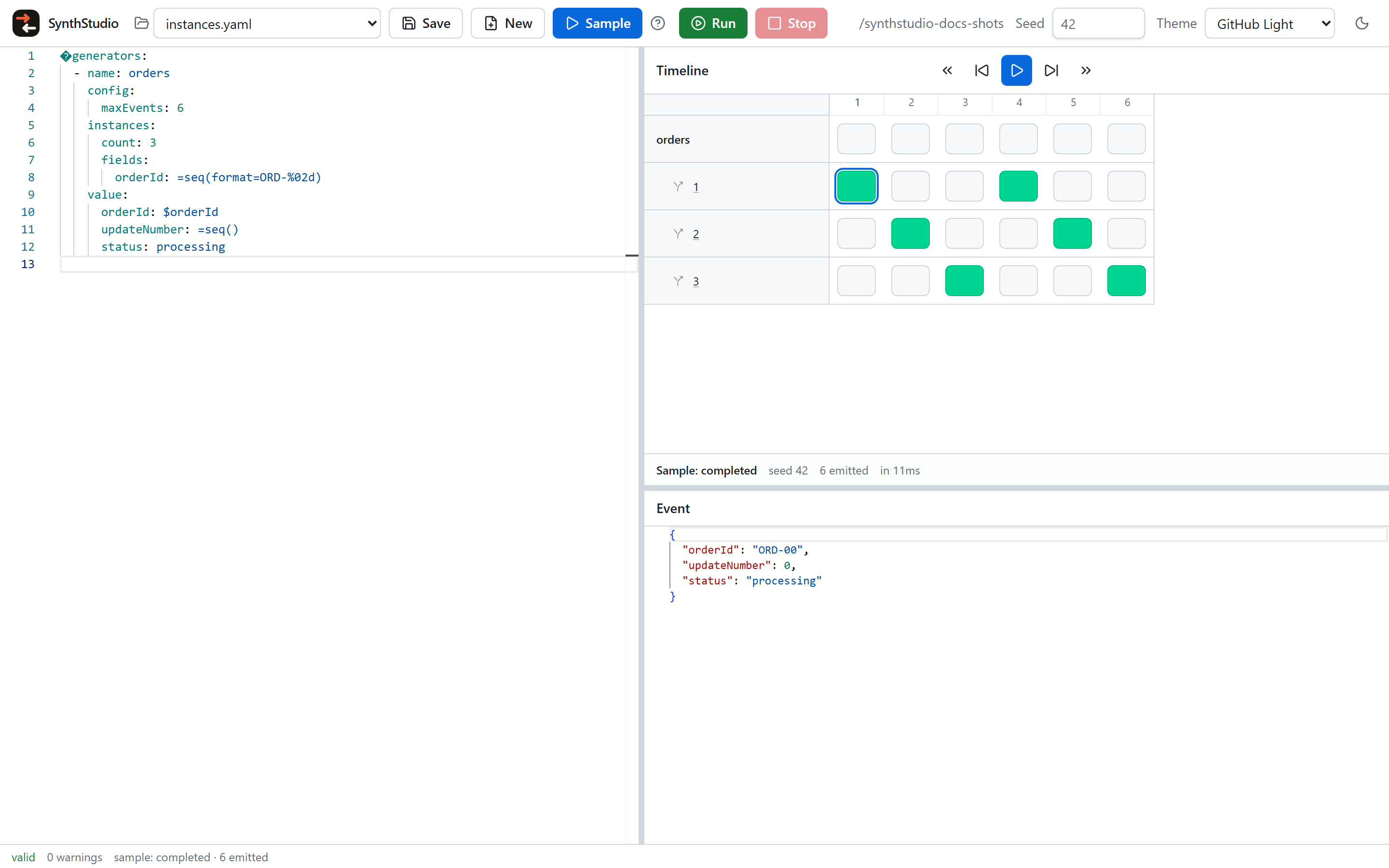
Event inspector
The inspector is read-only JSON of the selected event’s payload. It does not wrap metadata such as generator name or ordinal.
HTTP and storage Sample payloads are redacted preview envelopes — the same idea as CLI sample printing a destination-shaped envelope without contacting the destination.
Next: run to destinations, or dry-run like CLI run --stdout.